Trying to deploy the sample c# lambda failed on my machine with a strange “illegal characters in path” exception, the first impression was that it had something to do with the white spaces on the default visual studio project location “C:\Users\rdebug\Documents\Visual Studio 2015\Projects” so I switched to a directory without white space and got the same result :(.
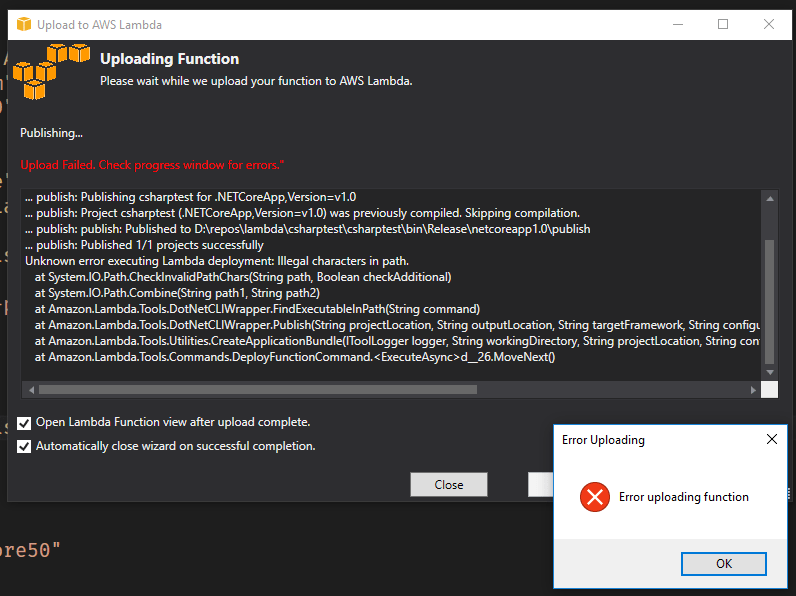
after some digging I found the source code of the aws lambda tools package on github
the piece raising the exceptions is this
        public static string FindExecutableInPath(string command)
        {

            if (File.Exists(command))
                return Path.GetFullPath(command);

            var envPath = Environment.GetEnvironmentVariable("PATH");
            foreach (var path in envPath.Split(Path.PathSeparator))
            {
                var fullPath = Path.Combine(path, command);
                if (File.Exists(fullPath))
                    return fullPath;
            }

            if (KNOWN_LOCATIONS.ContainsKey(command) && File.Exists(KNOWN_LOCATIONS[command]))
                return KNOWN_LOCATIONS[command];

            return null;
        }
the exception raised on the Path.Combine call inside the foreach loop, after testing this method in my local machine on a simple console application I found that my local PATH environment variable contains a segment triggering the “illegal characters in path”, the guilty piece is [“C:\Program Files (x86)\Java\jdk1.8.0_91\bin”], note that the quotes exist on the path string.

TLDR
if you get the “illegal characters in path” exception while trying to deploy a c# lambda function, check your PATH environment variable for quoted strings.



 rdebug